Best Color Analysis App 2026: 7 Tools Compared
All SeasonsComparisonSep 24, 2026 · 13 min read

Best Color Analysis App 2026: 7 Tools Compared

By Aiyi
Color Analysis EditorSep 24, 202613 min read

Aiyi is the founder and lead editor at Color Season AI. With a background in visual design and a personal obsession with seasonal color theory, she writes in-depth guides that blend research with real-world styling advice.

The quick answer: choose for the job after the result

Disclosure: Color Season AI publishes this guide, and Color Season AI is one of the products compared. We checked the public product pages, pricing information, and app-store listings cited below on September 24, 2026. This is a feature and use-case comparison, not a controlled accuracy test. We do not use star ratings, and none of the external links in this guide are affiliate links. Features and prices can change after our check date.

There is no single best color analysis app for every person. Our short answer is: choose Color Season AI for a free browser-based 12-season result with visible confidence and no sign-in before the first analysis; Palette Hunt for a polished one-time report with AI visual previews; Dressika for an established mobile beauty toolkit; Style DNA for ongoing closet and outfit planning; My Best Colors for checking garments while shopping; Colorwise.me for a lightweight DIY web workflow; and ColorMine AI for a fast quiz-to-app entry point.

Color Season AI is not the best choice if you want a native phone app, a fully managed digital closet, or a human analyst holding physical fabrics beside your face. We built it for someone who wants a useful answer in a browser before creating an account, plus a clear explanation of how the answer was reached. If your main job is daily outfit planning, Style DNA is broader. If you want virtual hair and makeup experiments inside a mature mobile app, Dressika is broader. If you want the highest-confidence diagnosis for a major hair or wardrobe investment, a skilled in-person analyst still offers something a selfie app cannot.

📌

Our verdict in one sentence

Start with the free tool that matches your workflow, repeat the test in neutral daylight, and pay only when the saved report, shopping workflow, or visual previews solve a real next decision.

Try Color Season AI Free →One analysis a day without an account · your result appears before any login prompt

Best color analysis apps 2026: side-by-side comparison

Laptop, phone, and pocket color swatches representing different color analysis app use cases

The table compares what you put in, what you keep, and what the product is designed to help you do next. “Free” means there is a usable free entry point; it does not mean every palette, preview, or styling feature is free. We avoid naming a universal accuracy winner because no shared 2026 benchmark has tested these seven tools under the same lighting, camera, skin-tone range, and professional reference standard.

Color Season AI (our tool)

A transparent free browser result

Platform
Web
Input
Selfie; optional quiz
What you get
12-season match, confidence, measured color traits, palette, avoid colors, guides
Pricing
One free analysis daily; optional credits and paid handbook

Palette Hunt

One-time report and visual previews

Platform
Web
Input
Guided photos
What you get
16-season report, 30-color palette, styling guidance, AI previews
Pricing
One-time purchase; site showed plans from $19 when checked

Dressika

Mobile makeup, hair, and wardrobe tools

Platform
iOS, iPadOS, Android
Input
Photo analysis or manual quiz
What you get
12-season palette, color matching, makeup and hair tools
Pricing
Free download; ads and in-app purchases

Style DNA

Daily outfits and a digital closet

Platform
iPhone
Input
Selfie plus wardrobe items
What you get
12-season profile, body/style guidance, closet, outfits, shopping
Pricing
Free download; subscriptions and in-app purchases

My Best Colors

Checking colors while shopping

Platform
iPhone, iPad
Input
Chosen season or in-app analysis kit
What you get
Pocket palettes, camera picker, draping filters, favorites
Pricing
Free core app; one-time premium upgrade

Colorwise.me

Free DIY analysis in a browser

Platform
Web
Input
Photo plus manual facial-color selection
What you get
Season suggestion, palette, digital draping and color tools
Pricing
Free web tools; related apps offer paid features

ColorMine AI

A quick quiz and palette preview

Platform
Web and iOS
Input
Five-question quiz; app-based analysis
What you get
12-season preview; full palettes and guides in the app
Pricing
Free web quiz; app offers paid features

1. Color Season AI — best for a free, explainable browser result

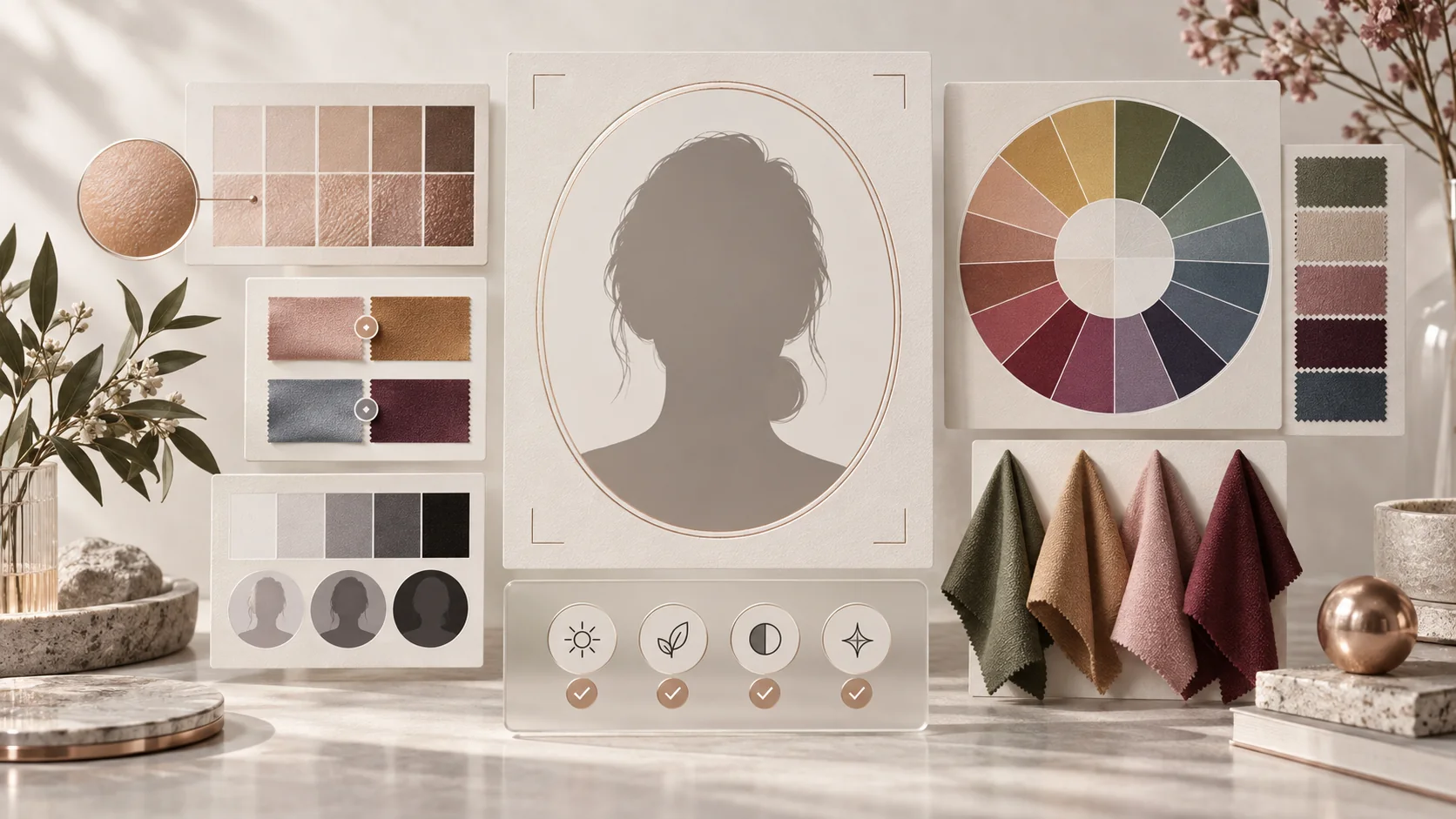
Color analysis evidence including skin tone samples, contrast tests, and a twelve-season color wheel

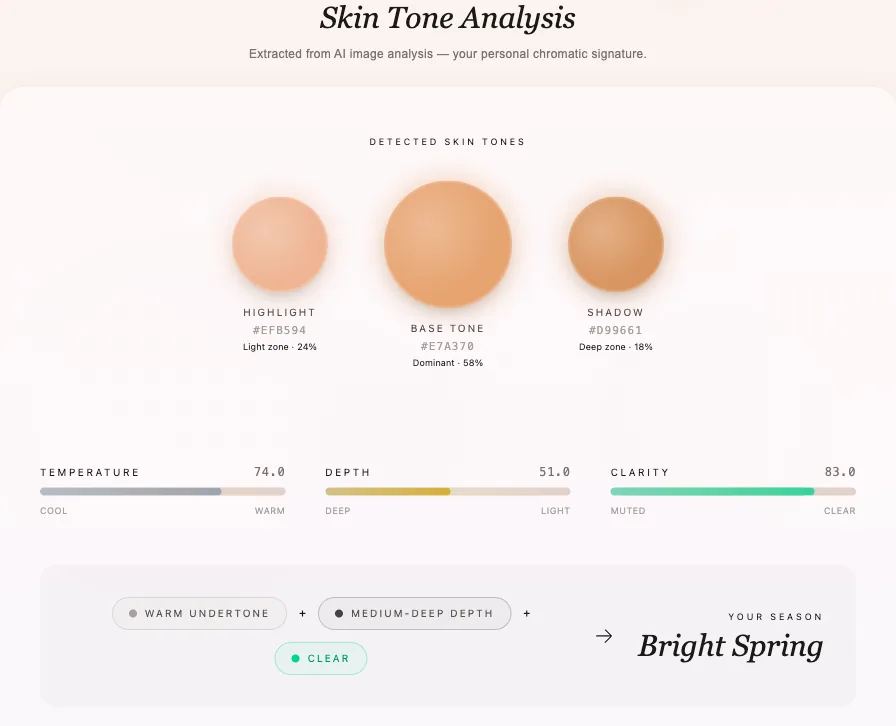
Color Season AI is our product, so here is the case for it and the case against it. A signed-out visitor can upload one daylight selfie and receive a 12-season result without creating an account first. The report shows temperature, depth, and clarity scores, a confidence estimate, neighboring seasons, best colors, colors to avoid, and a downloadable color card. The methodology page explains the current pipeline and its known failure cases instead of presenting the season as an unquestionable verdict.

Its strongest difference is result transparency. A borderline result is shown as borderline, and a poor photo can lower confidence. The result remains on the device for 60 minutes; signing up after seeing it saves the analysis and starts a longer style path. That is our retention and login model: value first, account second. A free account and daily check-ins can add credits, while optional purchases fund deeper reports and generative tools.

Choose us if you want a quick web result, do not want to install an app, and care about seeing why the model chose a season. Do not choose us if you need a native mobile app, want hundreds of garments organized into a digital closet, or prefer a human to interpret live drapes. Our roughly 80% internal figure includes the correct season or an adjacent season on clear selfies; it is self-testing, not an independent head-to-head benchmark, which is why we do not claim to be “the most accurate.”

Run My Free AnalysisNo sign-in before the result · use a clear, unfiltered daylight selfieGo→

2. Palette Hunt — best for a one-time report with visual previews

Palette Hunt combines guided photo analysis with a 16-season result, undertone, a 30-color palette, styling guidance, and AI previews for hair, makeup, outfits, and photoshoots. Its public site described one-time plans from $19 when we checked, while its own comparison page listed broader tiers; check the checkout screen for the current total before paying.

Palette Hunt does something genuinely better than our tool for a certain buyer: it packages the analysis and visual experimentation into a polished one-time purchase. If you are deciding on a salon color, event look, or photoshoot concept and want to see versions of yourself rather than just read swatches, that can be worth more than a free label.

It is less suitable if you only want a no-account first answer or if AI-generated previews are not part of your decision. Its homepage asks users to sign in as the first step, and its value is concentrated in the paid report and preview credits. Choose it for a contained “analyze me, then show me” experience; skip it for a lightweight free check.

3. Dressika — best mobile toolkit for color, makeup, and hair

Dressika is a mature mobile-first option on iOS and Android. Its official listings describe automatic photo analysis and a manual quiz, 12 seasonal palettes, clothing color matching, makeup recommendations, and extensive hair-color experiments. The Android listing showed more than five million downloads when checked, which matters if you value an established app workflow and a large feedback base.

Dressika is stronger than Color Season AI as an all-in-one phone companion for virtual beauty experimentation. It also supports more interface languages. The tradeoff is a more traditional freemium experience: the free download includes ads or limits, and app-store listings show multiple in-app purchase options whose availability and price vary by platform and region.

Choose Dressika if you want to keep exploring hair, makeup, and wardrobe colors from your phone after the season result. It is not the cleanest choice if you want a single browser session, a plainly documented model pipeline, or a report with confidence and adjacent-season reasoning.

4. Style DNA — best for turning a season into daily outfits

Style DNA is broader than a color-analysis app. Its iPhone listing describes a 12-season profile, body and style guidance, a virtual closet, five daily outfit ideas, an AI stylist, shopping recommendations, and item checks. If your real question is not “What season am I?” but “What should I wear from the clothes I own tomorrow?”, Style DNA has the clearest advantage in this group.

That breadth also makes it a heavier commitment. You need to add wardrobe information for the closet features to become useful, the interface is built around an ongoing relationship rather than a one-off answer, and unlimited access uses subscription pricing. The listing also says some contact information and identifiers may be linked to the user, so privacy-sensitive shoppers should read the current disclosure before uploading a wardrobe.

Choose Style DNA if outfit planning, closet organization, and personalized shopping are the goal. Do not choose it solely for the fastest free season check. Color Season AI is simpler at the moment of diagnosis; Style DNA is more capable after you already want a daily styling system.

5. My Best Colors — best pocket palette for real-world shopping

My Best Colors is closest to a digital swatch fan. Once you know or select your season, its camera color picker can compare a garment or object with your palette. The app also lists virtual draping filters, fabric previews, favorites, capsule palettes, color-type detection, and palettes for clothing, jewelry, eyeshadow, and lipstick. Its official listing describes a free ad-supported core and a one-time premium upgrade rather than a recurring subscription.

This is the better tool when your diagnosis is settled and the recurring problem happens under store lighting: “Does this specific sweater belong in my palette?” Color Season AI has a Chrome extension for checking online product colors, but My Best Colors is more purpose-built for pointing a phone camera at physical items.

Choose it as a shopping companion or as a way to train your eye. Do not expect the same report-first experience as a guided AI selfie analysis; the app is most valuable after you have a season you trust, and some advanced palettes or filters require the upgrade.

6. Colorwise.me — best free DIY color-analysis workspace

Colorwise.me has been offering browser-based personal color tools since 2018. Its current workflow lets you work from a photo, select representative facial colors, explore the 12-season system, use digital draping, recolor outfits, and connect the result to the wider My Best Colors and Wardling ecosystem. In August 2026, the company documented improvements to magnification and similar-color highlighting, useful changes for the manual color-picking step.

Colorwise is strong when you want hands-on control. Instead of accepting a black-box answer, you can inspect and adjust the colors sampled from your skin, hair, and eyes. That same control creates its limitation: shadows, highlights, dyed hair, and a poor selection point can alter the answer, and the workflow asks more of the user than one-tap automation.

Choose Colorwise if you enjoy experimenting and want free browser tools around the analysis. Choose an automatic tool if you would rather have the system handle the first pass, then confirm it with drapes.

7. ColorMine AI — best for a very fast quiz-to-app start

ColorMine AI offers a five-question web quiz covering sun response, veins, metals, and eye characteristics, then gives a 12-season preview. Its site directs users to the iOS app for a fuller palette of more than 50 colors, clothing recommendations, and makeup guides. This is an easy entry point for someone who is not ready to upload a face photo.

The strength is speed and familiarity: the questions take seconds and the language is accessible. The weakness is that self-reported vein color, sun reaction, and metal preference can reproduce the uncertainty that brought someone to the quiz. The site also makes strong accuracy comparisons with professional consultations without publishing a controlled validation protocol on the page we checked, so we would treat those claims as marketing rather than a cross-product benchmark.

Choose ColorMine for a quick, low-friction hypothesis and an app-centered palette. Confirm the result with neutral-light photos or real drapes before changing expensive hair color or replacing a wardrobe.

How we compared the apps—and what we refused to score

Real Color Season AI result showing detected skin tones and temperature, depth, and clarity measurements

We compared six practical criteria: the input required, whether the seasonal system is 12 or 16 types, what the user can see immediately, what remains useful after the result, the pricing model, and how clearly the product explains photo handling. We read official pages and current app-store listings, then separated documented features from marketing claims.

We did not award accuracy points. A fair accuracy table would require the same diverse group of people, controlled lighting, repeat photos, a declared reference standard, and multiple expert analysts to measure disagreement. None of the nine 2026 comparison pages in the search results supplied that shared test across all seven products. A number such as “95% accurate” is not comparable when the sample, definition of correct, and handling of adjacent seasons are missing.

We also did not score an app higher for having more features. A virtual closet is valuable when you will maintain it and clutter when you will not. A 16-season label is useful when the analysis can support that precision and confusing when it cannot. The best color analysis app is the one that reduces the next costly guess—not the one with the longest landing page.

1

Input quality

Does the tool guide lighting, framing, filters, and makeup—or quietly accept any image?

2

Result transparency

Can you see confidence, neighboring seasons, or the observations behind the label?

3

Useful output

Do you keep a practical palette, shopping tool, drape comparison, or styling guidance?

4

Business model

Is the useful layer free, one-time, subscription-based, ad-supported, or credit-based?

5

Privacy fit

Does the photo policy match your comfort level, and can you get value before making an account?

6

Repeatability

Can you retest under better light and compare whether the result survives?

Who should use Color Season AI—and who should not

Color Season AI fits a curious first-time user who wants a substantive answer before signing up, a browser workflow that works on phone or desktop, and enough reasoning to challenge a result. It also fits someone who wants to continue from a season into makeup, hair, outfit, and detailed palette guides without learning a large wardrobe app on day one.

It is not for someone who wants guaranteed professional certainty, a native offline app, or automatic daily outfits from a cataloged closet. It is also not a substitute for medical or cosmetic advice, and seasonal color is not an objective measure of attractiveness. If a result conflicts with what you repeatedly see in real fabrics, trust the repeated drape evidence and use the app as a hypothesis.

The free result is the top of our commercial funnel, and we want to be explicit about that. After you see the analysis, you can create a free account to save it, collect daily credits, build a Decision Card, and return to your style path. Paid credits and an optional personalized handbook support the product. You can still take the color analysis quiz, read the 12-season guide, or compare online and in-person analysis costs without paying.

💡

Best next step

Use one neutral-daylight selfie, save the result only after you have seen it, then repeat on another day before spending on hair color or a wardrobe reset.

See My Season and Confidence →Free first result · sign in only if you want to keep it beyond 60 minutes

Best color analysis app FAQ

These are the questions that matter most before you upload a selfie or pay for a report.

There is no universal winner. Color Season AI is best for a free, explainable browser result; Palette Hunt for a one-time report with AI previews; Dressika for mobile beauty tools; Style DNA for daily outfits and closet planning; My Best Colors for in-store color checking; Colorwise.me for hands-on DIY analysis; and ColorMine AI for a quick quiz-to-app start.

Yes. Color Season AI provides one free analysis per day and shows the result before sign-up. Colorwise.me offers free browser tools, ColorMine AI offers a free web quiz, and Dressika and My Best Colors have free app entry points with optional paid features.

Not in every case. An app is faster and cheaper, but a skilled analyst can control lighting, compare physical fabrics in real time, and interpret subtle skin changes. Use an app as a practical starting point and choose an in-person consultation when the decision is expensive or repeated app results conflict.

Take an unfiltered, front-facing photo in indirect daylight with minimal makeup and your natural hair visible. Avoid yellow bulbs, colored walls, direct sun, and portrait filters. Repeat the test on another day and confirm the direction with real warm-versus-cool and soft-versus-bright fabrics.

No. A finer system can describe border cases more precisely, but only if the input and analysis support that precision. A transparent 12-season result that shows confidence and neighboring palettes can be more useful than a highly specific label with no explanation.

Pay when the paid output changes a real decision: a reusable shopping palette, a detailed report, a saved closet workflow, or previews before a salon or clothing purchase. Do not pay merely to unlock a label you have not confirmed under neutral light.

Related Articles