Is AI Color Analysis Accurate? A Practical Test Guide
All Skin TonesGuideSep 27, 2026 · 15 min read

Is AI Color Analysis Accurate? A Practical Test Guide

By Aiyi
Color Analysis EditorSep 27, 202615 min read

Aiyi is the founder and lead editor at Color Season AI. With a background in visual design and a personal obsession with seasonal color theory, she writes in-depth guides that blend research with real-world styling advice.

The short answer: useful, conditional, and easy to over-trust

AI color analysis can give you a useful starting season, but a single selfie is never a laboratory measurement. A result deserves more trust when it repeats across two well-shot photos, shows its confidence and neighboring seasons, and still makes sense when you hold real fabric near your face. Warm bulbs, camera processing, makeup, colored walls, and thin training data can all produce a polished answer from poor evidence.

Because Color Season AI publishes this guide, our own tool appears in it. We explain what it gives you along with its limits. There is no defensible “most accurate” label today: no independent study has run every current color-analysis app on the same people, under the same light, with the same professional reference. Any universal ranking would be guesswork dressed as a table.

Try to reproduce the result before you buy a palette, change your hair, or rebuild a wardrobe. The test below takes two photos and a handful of clothes you already own.

📌

A result is a working hypothesis

Two good photos that point to the same season carry more weight than one confident result. If the answer moves, improve the evidence before you shop from it.

Try a Free Analysis →One free analysis daily · see the result before any sign-in prompt

Accuracy is four separate questions

A percentage such as “95% accurate” sounds reassuring until you ask what counted as correct. Did the tool repeat the same answer for the same file? Did it survive a second photo? Did it match one analyst, several analysts, or a fabric-draping session? Was an adjacent season accepted as a hit? Without those details, two percentages cannot be compared.

Color analysis also lacks a single agreed ground truth. A person near the Soft Summer and Soft Autumn boundary may receive different labels from skilled analysts while getting similar practical advice: medium depth, muted color, and a neutral temperature. The label disagreement looks larger than the wardrobe disagreement. Four separate checks give a more honest picture.

1

Same-photo repeatability

Run the exact file again. A deterministic tool should not wander between unrelated seasons when the input has not changed.

2

Photo-to-photo stability

Use two clean daylight photos taken on different days. A useful result should stay put or move only to a close neighbor.

3

Agreement with controlled draping

Compare the proposed palette with real fabric near the face. Watch the skin, shadows, eyes, and mouth rather than the fabric itself.

4

Usefulness in real clothes

Wear several recommended and avoid colors over a week. A good result predicts a pattern, not one lucky shirt.

Our methodology page describes how Color Season AI reads undertone, depth, and chroma. It also reports an internal figure of roughly 80% for the exact or an adjacent season on clear selfies. That is self-testing, not an independent head-to-head study, and the adjacent-season rule matters. We publish the distinction because it changes what the number means.

Dark skin and Asian skin need different checks

“Does it work on Asian skin?” is too broad to answer with one yes or no. Asia includes East, Southeast, South, Central, and West Asian populations. Within those groups, skin ranges from very light to very deep and from red-leaning to yellow-leaning, with neutral and olive combinations in between. Dark skin describes depth. Asian describes geography and ancestry. They are different variables.

That distinction matters because many older systems and image datasets reduce skin to a light-to-dark strip. The ICCV paper Beyond Skin Tone: A Multidimensional Measure of Apparent Skin Color adds a red-to-yellow hue dimension and finds that dark-yellow skin is underrepresented in common image datasets. A model can cover several depths and still miss an important part of the color range.

The photo can distort those differences further. Google has documented how face detection, auto exposure, white balance, stray light, and low-light sharpness historically worked less well for darker skin. Its Image equity work changed both datasets and camera tuning. Those improvements help the photo look more representative, but color-analysis software still receives the phone’s processed version of your face.

Asian users face a separate shortcut in traditional seasonal typing. Dark hair plus dark eyes often gets read as “deep” or “high contrast” before anyone checks what happens to the skin beside color. A study of 200 Korean women found that British, Japanese, Korean, and German personal-color systems weighted lightness, redness, and yellowness differently. The same face can enter a different system and come out with a different label. Read the study here: A Comparative Analysis of the Skin Color According to Seasonal Types in Personal Color Systems.

⚠️

What a serious tool should show

Look for examples across skin depth and hue, separate readings for undertone and depth, a confidence score, nearby alternatives, and a retake request when the image is unreliable. “Works on every skin tone” is not evidence by itself.

For a closer look at green-grey or hard-to-match coloring, use our olive skin guide. The broader skin tone guide explains depth without treating it as a season. A person with deep skin can belong to any parent season; “Deep” in a seasonal label describes the colors that work, not ethnicity.

Why two apps can look at one face and disagree

Before an app names a season, several systems have already changed or interpreted the image. The room lights the face. The phone chooses exposure, white balance, HDR, sharpening, and sometimes skin smoothing. The app finds a face and decides which pixels count as skin. It may sample the forehead, cheeks, jaw, eyes, and hair with different weights. The final measurements are then mapped onto a four-, twelve-, or sixteen-season model with thresholds chosen by that product.

Small changes near a threshold have large effects on the name. A neutral-muted face near the Soft Summer and Soft Autumn border can move when one photo records slightly more yellow. Bright Spring and Bright Winter can trade places when contrast is obvious but temperature is close. A jump from Light Summer to Deep Autumn is harder to explain as a close call; it usually points to a bad photo, incompatible systems, or a weak method.

1

Light reaches the face

Window light, warm bulbs, direct sun, and colored walls change the color that reaches the camera.

2

The phone edits the scene

Auto exposure, white balance, HDR, portrait lighting, and beauty settings alter the file before an app sees it.

3

The app chooses evidence

One tool may prioritize skin; another may give more weight to hair, eyes, or overall contrast.

4

A season system draws borders

Four-, twelve-, and sixteen-season systems divide the same continuous traits at different points.

5

The product chooses what to reveal

Some apps show confidence and alternatives. Others force one label even when the top two scores are nearly tied.

The Google Research article Consensus and subjectivity of skin tone annotation for ML fairness found that lighting, screen conditions, and the annotator’s geographic context can affect skin-tone judgments. An app result sits at the end of that same messy chain. When apps disagree, inspect the evidence before choosing a side.

Use this 2 × 2 test before trusting either answer

You can usually tell whether the photo or the method caused the conflict without knowing how either model was built. Keep one variable fixed, change the other, and write down the result before you start looking for the answer you hoped to get.

Hold the photo still

Hold the app still

Run

Send the same original photo through several apps.

Send two good photos from different days through one app.

Tests

Differences in sampling, season systems, thresholds, and model logic.

Sensitivity to light, camera processing, framing, and background.

Good sign

Different labels still cluster around the same practical color direction.

The result repeats or stays within one adjacent season.

Warning sign

The apps disagree on every axis and none explains why.

Minor photo changes produce unrelated seasons with high confidence.

Run the exact same file twice as a third check. If the app changes its answer, repeatability is the problem. If the same file is stable but a second daylight photo moves the result, compare the photos for warmth, exposure, background color, and beauty processing. When two good photos land on neighboring seasons, test those two palettes with online color draping or real fabric instead of collecting more labels.

What “free” should mean after you upload a face

“Free app” often means free installation. The useful result may still sit behind a subscription screen after you take the photo. For this guide, a free color analysis has to show a season, a usable palette, and enough reasoning to judge the answer without starting a trial. Charging for saved history, a long handbook, closet tools, or generated previews is a separate matter because the first result already stands on its own.

We checked the public flows and official listings below on September 27, 2026. Products change their limits by version, platform, and country, so treat the date as part of the table.

Color Season AI (our tool)

A full browser result before sign-in

Platform
Web
Input
One daylight selfie; optional quiz
What you get
12-season match, confidence, three measured traits, neighboring seasons, best and avoid colors, downloadable card
Pricing
One free analysis daily; optional credits and paid handbook after the core result

Colorwise.me

Hands-on DIY color sampling

Platform
Web
Input
Photo plus manual skin, hair, and eye color selection
What you get
Season suggestion, palette, digital draping, and color tools
Pricing
Core web tools are free; related apps contain paid extras

Perfect Corp demo

A quick no-account browser demo

Platform
Supported web browsers
Input
Camera or sample model, depending on device
What you get
Personal-color palette demo
Pricing
Official page describes the demo as free; browser and device support is limited

Dressika

A basic mobile result with beauty tools

Platform
iOS and Android
Input
Photo analysis or manual quiz
What you get
Basic season result; additional palettes, retests, hair, makeup, and wardrobe tools vary by tier
Pricing
Free entry point with ads, limits, and in-app purchases

Price tells you little about diagnostic accuracy. Payment usually buys more after the diagnosis: extra colors, saved history, closet planning, previews, or human review. Our 2026 color analysis app comparison covers those jobs in detail. Here, the standard is narrower: can you see enough of the result to decide whether it deserves trust?

Take a photo the app can actually read

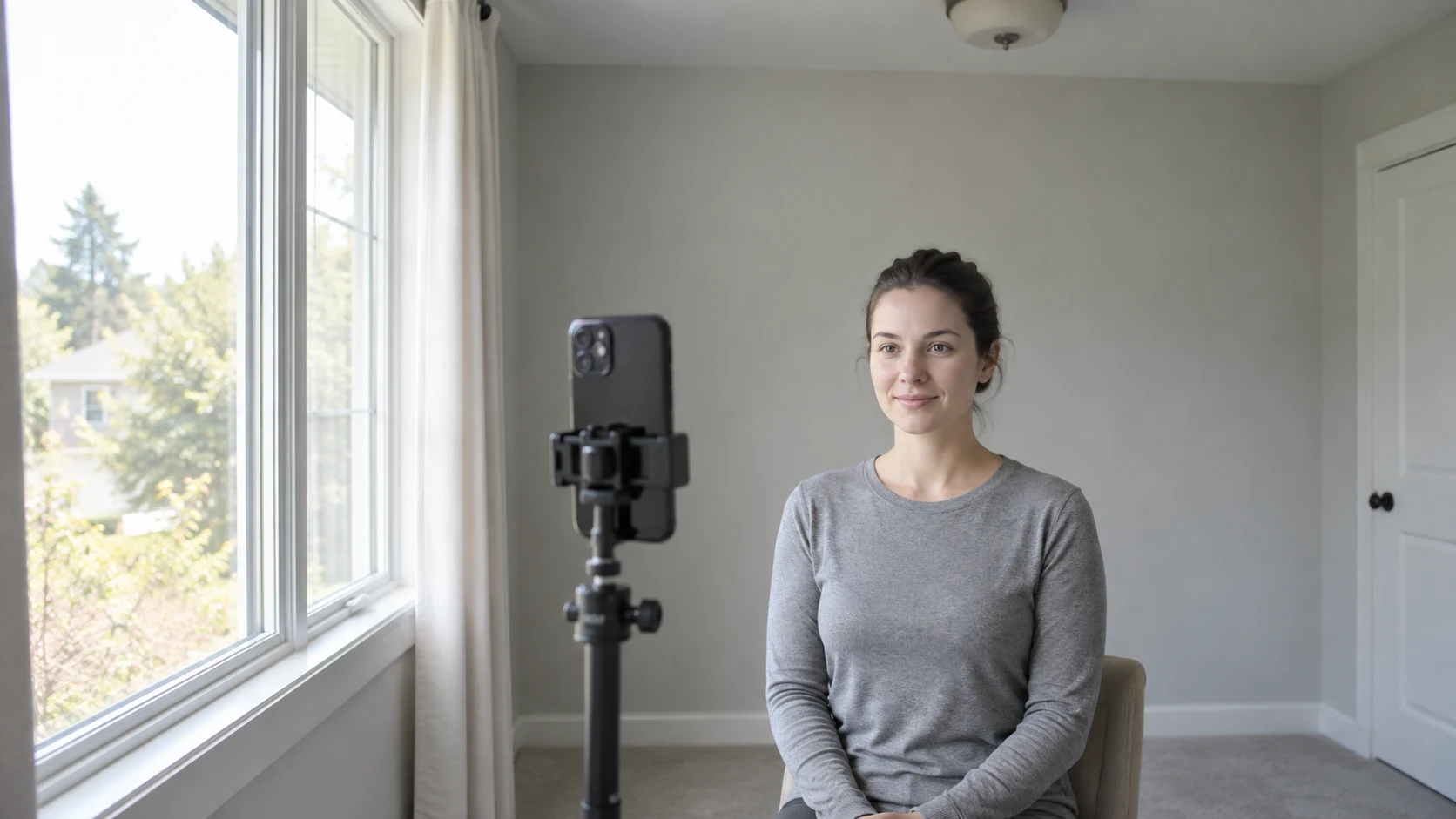
Accurate AI color analysis photo setup with a person facing soft window light, a phone on a tripod, and a neutral gray wall

The best camera is the one that gives you a repeatable, boring photo. Stand a few feet from a window during the day and face it directly or at a slight angle. The light should reach both cheeks evenly. Turn off the room lights, since a warm ceiling bulb mixed with cool window light gives the app two white balances to solve in one face.

Use a white or light-gray wall behind you. Beige paint, wood paneling, a pink bedroom wall, or a bright blue curtain can reflect color onto the jaw and can also change how the phone sets white balance. Google’s camera team recommends bright, indirect natural light for accurate headshots in How to take great ID photos with your Google Pixel. The same setup is useful here.

1

Remove color-changing products

Skip foundation, blush, bronzer, strong lipstick, tinted sunscreen, and colored contact lenses.

2

Turn off camera styling

Disable beauty mode, filters, portrait relighting, makeup effects, and photographic styles where possible.

3

Keep nearby color quiet

Wear white, gray, or another low-chroma neutral and move bright objects away from the face.

4

Show the face clearly

Use a straight-on angle, a natural expression, open eyes, and enough resolution to see the iris and skin texture.

5

Handle dyed hair honestly

Take one photo with the hair as worn and another with strongly dyed lengths pulled back or covered.

6

Upload the original file

Avoid screenshots, social-media downloads, and edited exports because they may shift color or compress detail.

Clean the lens before you shoot. If the phone allows exposure or white-balance lock, use it across the set. Otherwise, keep the framing and background steady so the automatic settings have less reason to move. Take three photos in the same session, choose the most even one, then repeat the setup on another day. The second day reveals whether the result can survive a fresh exposure and a slightly different sky.

Use This Photo for a Free Analysis →No account before the result · sign in only if you want to save and compare later

Read the result as evidence

The season name comes at the end of the analysis. First check whether the description of your temperature, depth, and clarity resembles what you see in neutral daylight. Then look at how close the runner-up was. A 52% result against a 48% neighbor calls for a drape test. A tool that hides the second score makes ordinary uncertainty look like certainty.

The distance between results matters more than the fact that they differ. Adjacent seasons share one or two traits. Unrelated seasons disagree about the basic evidence. Use the pattern below to decide what to do next.

✕

Red light: unrelated seasons appear from similar good photos

✓

Stop buying from either palette. Check filters, exposure, background color, and whether the app explains its confidence.

✕

Yellow light: two neighboring seasons keep trading places

✓

Compare those neighbors with controlled drapes. You may sit near a real category boundary.

✕

Green light: the same direction survives two days and several fabrics

✓

Use the palette as a working guide. Save the result and test it gradually in clothes you already own.

Keep your first test cheap. Photograph three tops that reliably make your face look even and three that tend to bring out shadows or redness. Compare their temperature, depth, and saturation with the app’s recommendation. That small personal record is better evidence than finding a celebrity who seems to have similar coloring.

When a paid or in-person analysis earns its price

A skilled analyst has one advantage a selfie cannot reproduce: they can place many physical fabrics beside your face under controlled light and watch the skin change in real time. That extra information matters when you sit between seasons or when the next decision is expensive.

Consider an in-person session before a major salon color, a wedding wardrobe, a professional capsule wardrobe, or any large clear-out based on uncertain results. It also makes sense when several well-shot photos still disagree or when cameras consistently render your skin poorly. Our in-person versus free AI comparison covers cost and trade-offs, while the color analysis near me guide explains what to ask before booking.

Paid app features can be worth it for a different reason. A saved closet, a reusable shopping palette, or realistic hair previews may solve a daily problem after the season is settled. Paying only to reveal a label you cannot inspect is a weaker bargain.

How Color Season AI handles the trade-offs

Real Color Season AI result page showing a 12-season result, confidence, neighboring seasons, and a personal color palette

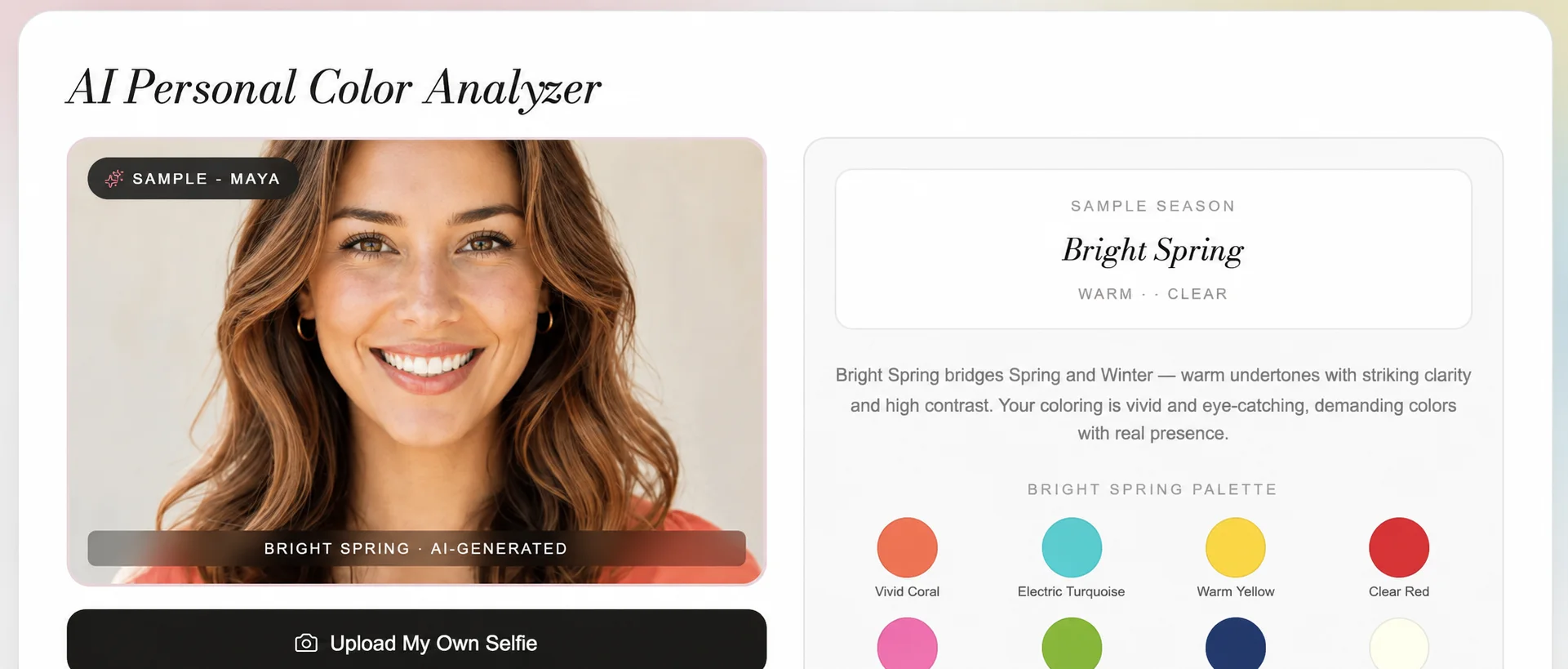
Color Season AI gives a signed-out visitor one free analysis each day. The result includes a 12-season match, temperature, depth, clarity, a confidence estimate, nearby seasons, recommended colors, colors to avoid, and a downloadable color card. You see that core result before any login prompt. An account is useful later if you want to save analyses and compare how your profile develops.

The system still sees a camera image, with all the limits described above. It cannot observe live fabric reflection, and our current performance figure is an internal test rather than an independent clinical-style validation. We would rather show a lower-confidence result and a close alternative than turn a borderline reading into a louder claim.

If you want to inspect the pipeline before uploading, read how our AI color analysis works. If you already know your likely season, How to Determine Your Color Season gives you a fabric-based confirmation process.

📌

Our standard for a useful result

The core answer should appear before payment, uncertainty should stay visible, and the user should be able to retest under better conditions without rebuilding a wardrobe around the first selfie.

Questions people ask after conflicting results

These are the questions that usually come up after a first test, especially when two apps disagree or the result does not match a familiar stereotype.

It can narrow you to a useful season or neighboring pair when the photo is clear and the method shows its reasoning. No current app has a universal, independently verified accuracy rate across every camera, lighting condition, skin tone, and season system.

Yes, every parent season can include deep skin. Accuracy depends on exposure, white balance, skin-tone representation in the model, and whether the method separates skin depth from undertone instead of assuming all deep coloring belongs to Autumn or Winter.

It can, but “Asian skin” is not one color category. Look for a method that covers different depths, red-to-yellow hue variation, olive and neutral undertones, and does not assign a season from dark hair and eyes alone.

Apps may receive photos with different white balance, sample different parts of the face, weight skin, hair, and eyes differently, and use different season systems or decision thresholds. Borderline coloring makes small differences more visible in the final label.

Color Season AI shows one full core result per day before sign-in. Colorwise.me also has free browser tools. Other apps may provide a basic season while charging for the complete palette, repeat analyses, exports, or styling features, so check the result flow rather than the download price.

Use an original, unfiltered, front-facing photo in soft indirect daylight. Turn off indoor lights, use a white or light-gray background, remove color cosmetics, wear a neutral top, and keep strongly dyed hair away from the cheeks for a second version.

An app is a convenient first pass. A trained analyst can control the light and watch how many physical fabrics reflect onto the face, which is more informative for close cases and expensive hair or wardrobe decisions.

Test the Result for YourselfFree first result · repeat it under the same neutral-light setupGo→

Related Articles