
The Color Season Chrome Extension
Knowing you are a Deep Winter does not help much when a jumper is listed as “forest.” Pick the color off any page and get a verdict in the same second you are deciding.
Try it right here first — this checker runs the extension’s exact scoring.
Measured against Light Spring’s 8 core shades and its 4 avoid shades — hover any swatch for its name and hex.
Light Spring core palette: Peach Cream, Warm Ivory, Soft Coral, Light Aqua, Butter Yellow, Blush Pink, Warm Mint, Golden Beige.
Pick a color and you will get the same four-way verdict the extension gives you on a product page — in your palette, works for you, skip this one, or outside your palette.
That verdict, on every page you shop.
The checker above only works on this page. Install the color season Chrome extension and the same eyedropper sits in your toolbar on ASOS, Zara, Amazon, a Pinterest board, or a photo a friend sent you.
Your palette is right. The product page is the problem.
Most people who get analysed do the same thing afterwards: screenshot the palette, save it to their camera roll, and promise themselves they will check it before buying. It survives about two weeks. Not because the palette is wrong, but because nothing about how you actually shop lets you use it.
One color name covers a dozen colors
Retailers name colors for mood, not for hue. Three jumpers listed as the same shade can sit far enough apart that one flatters you and another drains you — and the listing gives you no way to tell which is which.
All nine of these appear under one of three names in real listings.
You are comparing from memory, badly
Eyes are excellent at judging two colors side by side and poor at judging one color against a remembered one. By the time you have switched to the screenshot and back to the tab, the comparison you were making has quietly become a guess. Holding the picked color and the nearest palette shade in the same card removes the memory step entirely.
The near-misses are the expensive ones
Nobody needs help rejecting a color that is obviously wrong. The returns pile up around shades that are one step off — a warm-leaning red when yours are blue-based, a muted teal when yours are clear. Those are exactly the calls the eye cannot make alone, and exactly what a numeric distance is good at.
What the color season Chrome extension actually decides
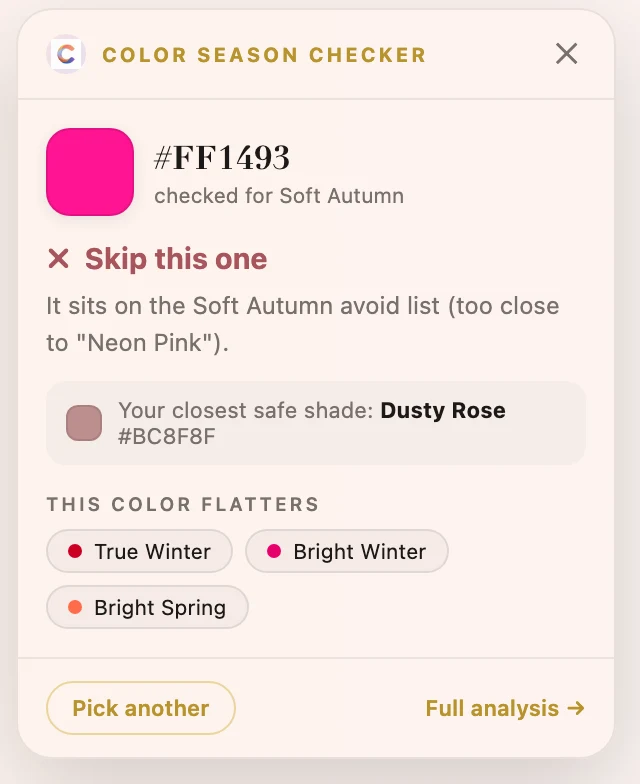
Every pick is measured in OKLab, a color space built so that equal numeric steps look like equal visual steps to a human eye — which plain RGB distance does not. The picked shade is compared against every color in your season’s core palette and every color on its avoid list, and the nearest of the two decides which of four things you are told.
✓In your palette
within ~6 of a palette shade
Visually the same color as something already in your season. Buy it without thinking about it.
≈Works for you
within ~14
Clearly related to a palette shade — a slightly deeper or softer version. Safe, and where most real clothing lands.
✗Skip this one
closer to an avoid shade than to any palette shade
It sits in the range your season specifically fights with. This is the verdict worth trusting most.
–Outside your palette
more than ~14 from everything
Not on the avoid list — simply not among the shades held for your season. You are told which way it missed (lighter, more vivid), the closest shade that does work with its hex, and which of the twelve it does belong to.
Where it stops being reliable
It reads the pixel on your screen, not the fabric. A product photo has already passed through the studio lighting, someone’s edit, and your own display before it reaches the eyedropper — so a shade can be a few steps off what arrives in the box. Two other things it cannot see: sheen, because satin and matte in the same dye read differently in person, and pattern, because sampling one pixel of a print tells you about that pixel. Treat a “skip this one” as a strong signal and a borderline call as what it is — a close call.
Setting it up takes about a minute
1. Add it to Chrome
From the Web Store listing. It works in Chrome, Edge, Brave, Arc, and anything else built on Chromium 95 or newer.
2. Pick your season once
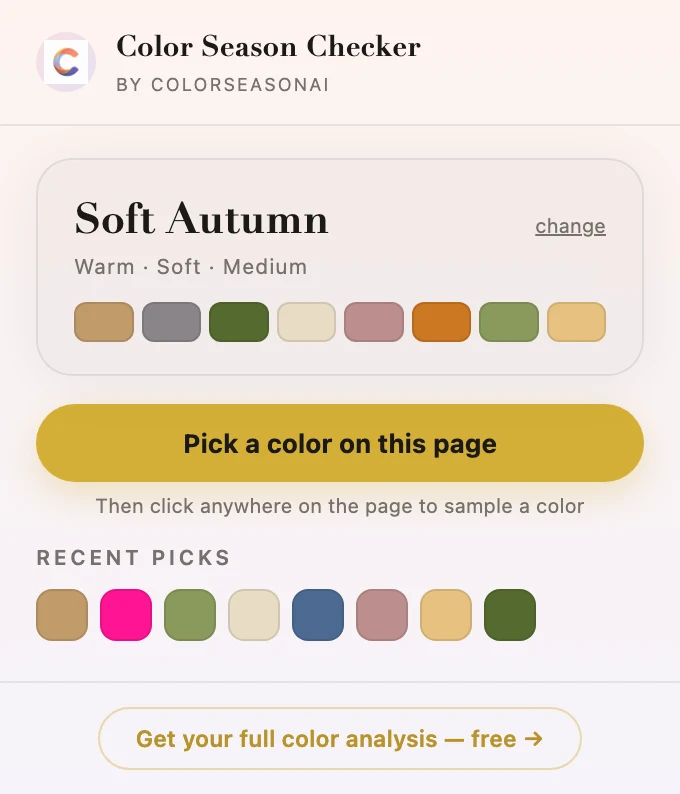
Choose from the twelve, and the popup remembers it. If you have no idea which one you are, the popup links straight to the free analysis instead of guessing for you.
3. Click “Pick a color on this page”
Then click the shade you care about — the sleeve of a coat, a swatch thumbnail, a lipstick cap. The verdict card appears in the corner. Esc dismisses it.
What it can and cannot see
- Nothing is sent to us. The color scoring runs inside your browser. No account, no sign-in, no analytics on what you pick or where you picked it.
- It only reads a page when you ask it to. The eyedropper is injected on the tab you are looking at, at the moment you press the button — it is not sitting on every site you open.
- Storage stays yours. Your chosen season syncs through your own Chrome account so it follows you between machines; the last 30 picks stay on the device.
You need a season before any of this works
The checker and the extension both start from one answer: which of the twelve palettes is yours. If you have never been analysed — or you were typed years ago and never quite believed it — get that settled first and everything downstream becomes automatic.
Sign in afterwards and your result is saved to your account — so the season you set in the extension and the one on this site stay the same answer.
Questions people ask before installing
›Is the color season Chrome extension free?
Yes — Color Season Checker is free, with no account, no trial, and no paid tier. It never asks you to sign in, because the scoring happens locally in your browser and there is nothing for us to charge you to store.
›Which browsers does it work in?
Any Chromium browser on version 95 or newer: Chrome, Edge, Brave, Arc, Opera and Vivaldi all install it from the same Chrome Web Store listing. Version 95 is the floor because the extension uses the browser's native EyeDropper to sample pixels. Firefox and Safari do not offer that API, so there is no build for them yet.
›Do I have to know my season before installing it?
You need one to get verdicts, but you do not need to arrive with it. The popup lets you pick any of the twelve palettes, and links to a free AI analysis if you are unsure. You can change your season at any time from the popup — useful if you are torn between two neighbouring seasons and want to shop each palette for a week.
›Does it work on product photos or only flat color swatches?
Both, with a caveat. On a flat swatch the reading is exact. On a photographed garment you are sampling one pixel that has been through studio lighting, retouching and your own screen, so it can drift a few steps from the fabric in hand. Sample a mid-tone area away from highlights and shadows, and treat a borderline result as a close call rather than a ruling.
›Does the extension track what I browse or shop for?
No. It sends nothing to Color Season AI — no colors, no URLs, no analytics. The page content permission is used only to inject the eyedropper into the tab you are on at the moment you press the button. Your selected season syncs through your own Chrome account, and your last 30 picks are stored locally on the device.
›Why does it disagree with the shop's own color name?
Because names are marketing and hex codes are not. "Sage", "blush" and "navy" each cover a wide spread of actual colors, and two retailers rarely mean the same shade by them. The extension ignores the label entirely and measures the pixel you clicked against your palette, which is why it will call one sage jumper a match and the next one a skip.
›Does it work on Pinterest, Instagram or a screenshot?
Anywhere the color is on screen in a browser tab, yes — pinned outfits, a lookbook, a friend's photo, a paint supplier's page. The eyedropper does not care whether the pixel belongs to a product listing. It cannot reach into a native desktop app or a PDF opened outside the browser.
Where to go next
Matching a wardrobe to your season
What to do once you can tell match from skip.
Side-by-side color draping
Compare two palettes on your own face before you commit.
Build a personal color palette
Turn twelve swatches into shades you actually own.
How to determine your color season
The tests behind the answer the extension relies on.